Improve Website Accessibility Without Compromising Design
How Singapore businesses can build accessible websites without sacrificing design quality.
Table of contents
Free Website Audit
We'll personally review your website across 6 areas. UX, SEO, performance, mobile, conversion, and send you a detailed, actionable report within 48 hours. No cost. No catch.
Website accessibility means every visitor can use and understand your site. That includes the roughly 789,000 Singapore residents aged 65 and over. It also includes an estimated one in six people living with a disability. You fix it with four things: colour contrast, readable typography, clear ARIA labels and alt text, and full keyboard navigation. None of this requires abandoning your brand. At ALF Design Group, the accessible version of a design is usually the better-looking one too. Higher contrast and cleaner typography read as good design in their own right.
The Business Case for Accessible Design in Singapore
Accessible websites reach more customers and rank better in Google. They also protect your business from overlooking a population that is ageing faster than most people realise.
Singapore's resident population aged 65 and over reached 18.8% in 2025, up from 18.0% the year before. That's roughly 789,000 people (SingStat, 2025). Globally, the World Health Organization estimates around one in six people live with a significant disability. That's some 1.3 billion people worldwide (WHO, 2023). Every one of them is a potential customer your website either welcomes or turns away.
The commercial case goes further than reach. Accessible sites are built on semantic HTML, descriptive alt text and meaningful link labels. All of that helps Google understand your content. It increasingly feeds into how AI-powered search evaluates pages, too. We cover this in our guide to UX signals that influence AI search rankings. Many accessibility fixes also improve the experience for every visitor, not only those with disabilities. Clearer forms convert better. Better structure ranks better.
That's the standard we build to at ALF Design Group, a Singapore web design agency built around Webflow.
What Does WCAG 2.1 AA Actually Require?
WCAG 2.1 AA is the accessibility standard most Singapore businesses should build to. It's the level IMDA recommends for public sector digital services. It's also the level most enterprise clients now specify in vendor requirements.
The Web Content Accessibility Guidelines, published by the W3C, rest on four principles known as POUR. Content must be Perceivable, so nothing depends on a single sense such as sight or hearing alone. It must be Operable, so every feature works by keyboard as well as mouse. It must be Understandable, with predictable navigation and clear error messages. And it must be Robust, built on valid HTML that works reliably across browsers and assistive technology.
WCAG 2.2, released in October 2023, added criteria for cognitive accessibility and mobile use. That includes a minimum 24 by 24 pixel touch target and simpler authentication that doesn't rely on memory tests. If you're building a new Singapore website in 2026, design to WCAG 2.2 AA from the start. If your site was already built to 2.1 AA, run a focused gap check against the newer criteria. That's a sensible next step, not a full rebuild.
How Do You Design an Accessible Website Without Losing Your Brand?
Colour Contrast
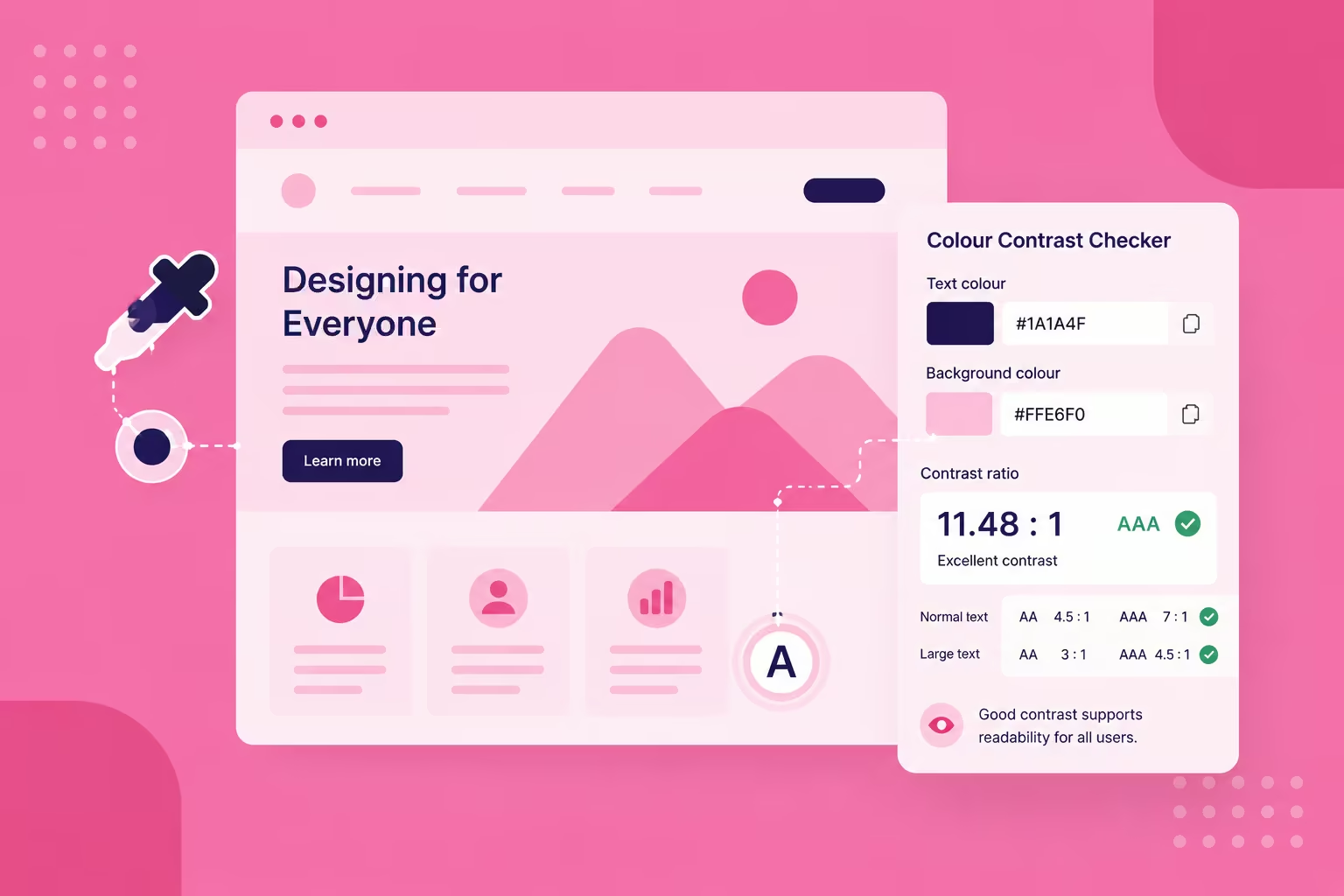
Colour contrast is the accessibility criterion Singapore websites fail most often, and one of the easiest to fix. WCAG 2.1 AA requires a 4.5:1 contrast ratio between text and background for standard body copy. Large text at 18pt, or 14pt bold, needs 3:1. That covers body copy, buttons, links, form labels and error messages.
Most contrast failures we see at ALF trace back to one of two causes. Either the client's existing brand colours weren't built for screens, or the layout came from a print template. A graphic designer built it for paper, not screens. Neither is a design mistake exactly, it's a mismatch. A palette that reads beautifully on a business card or a poster can fail badly on a screen. Lighting, screen quality and smaller type all work against low contrast there.
High contrast does not mean ugly. Some of the best-looking, highest-converting websites use bold, high-contrast colour. Contrast clarity is a core design principle, not a compromise. Check contrast during design, not after launch, using Stark for Figma, WebAIM's contrast checker, or Lighthouse in Chrome DevTools.
Typography

Typography accessibility comes down to size, typeface and spacing. It's where brand consistency most often collides with readability. Just this year, a client asked us to match their website's letter spacing exactly to their graphic designer's print template. We could do it, but we were honest about the trade-off. Tightened kerning looks sharp in a printed brochure. On screen, it can make body text harder to read, where the eye works against smaller type and variable lighting.
Three rules cover most of it. Keep body text at 16px on desktop. Never drop below 14px anywhere legible content appears, or visitors will zoom to read it. Choose a sans-serif typeface, such as Inter, Roboto or Plus Jakarta Sans, over a condensed or display face. For the full shortlist, see our guide to Google Fonts for readability. And give body text a line height of at least 1.5 times its font size, with generous paragraph spacing.
Responsive Layouts and Visual Hierarchy
Responsive design and accessibility are the same problem seen from two angles. A layout that breaks on mobile fails most Singapore visitors, who browse primarily on phones. Use relative units, such as rem and percentage widths, so text scales with a visitor's own browser settings. Avoid layouts that force horizontal scrolling. Keep interactive elements to at least 44 by 44 pixels, so they're easy to tap.
Heading structure does similar double duty. Use one H1 per page, H2s for major sections, and H3s for the detail beneath them. Never skip a level, and never choose by visual size alone. Screen reader users navigate by jumping between headings. A page with the right structure is also the page that reads clearly to everyone else. It ranks better for that too, as we cover in our guide to web design best practices.
Common Accessibility Mistakes on Singapore Websites
Beyond colour and type, most accessibility failures on Singapore business websites come down to five recurring mistakes.
Keyboard navigation gaps. Every action on your website, clicking links, opening menus, submitting forms, should work without a mouse. This is a WCAG Level A requirement, not an optional extra. It matters for anyone using a keyboard, a switch control, or a screen reader.
Missing or removed focus states. Designers often strip the browser's default focus outline because it clashes with the visual design, without replacing it with anything. The fix is a visible, on-brand focus style, not no focus style at all.
Dropdown menus that need a mouse. Navigation that only opens on hover locks out keyboard users entirely. Menus should open on Enter or Space and close on Escape.
No skip link. A hidden "skip to main content" link, revealed on the first Tab press, saves keyboard and screen reader users time. Otherwise, they tab through your entire navigation on every page.
Icon-only buttons with no label. A button with only an icon, and no visible text or aria-label, is invisible to a screen reader. That's true however clear it looks visually.
None of these require a rebuild. Most are a focused afternoon's work for whoever maintains your site. For more on getting navigation and menu structure right, see our guide to sidebar design for web apps.
How Do You Make Website Content Accessible?
Alt Text and ARIA Labels

Alt text and ARIA labels tell a screen reader what an image or interactive element does. That matters when a visitor can't see it. Every meaningful image needs alt text describing what it shows and why it matters, not just what it depicts. Purely decorative images should carry an empty alt attribute, so screen readers skip them rather than announcing a filename.
Webflow actually flags a lot of this for you. It warns you at publish time if images are missing alt text, or interactive elements are missing ARIA labels. That's one of the more useful built-in checks we lean on during a client review. It matters especially for images that load in late. A missing label is easy to miss on a quick visual scan.
ARIA should supplement HTML, not replace it. A native button element already has keyboard access and role announcement built in. A styled div pretending to be one needs all of that added by hand. It's also more likely to be built wrong.
Forms and Multimedia

Forms are the highest-stakes accessibility surface on most business websites, because they're where conversions happen. Every field needs a real label element, not just placeholder text, which disappears on focus and isn't reliably announced. Errors need to be described in text, not colour alone, and tied to the specific field that caused them. For ARIA patterns for complex form components, see our dedicated guide to form accessibility for Singapore websites.
Video needs captions, and audio needs a transcript. Auto-generated captions from YouTube or similar tools need a human check before publishing, particularly for brand names and technical terms. Never let media autoplay. It's both an accessibility barrier and a UX failure for every visitor, not only those using assistive technology.
Testing Your Website's Accessibility

Testing an existing website for accessibility takes a mix of automated scanning and manual checks, because neither alone is enough. Automated tools, such as Google Lighthouse, axe DevTools and WAVE, catch 20-40% of accessibility issues (Applause, 2025). Between them, they cover roughly a quarter of WCAG Level A criteria and less than a fifth of Level AA. The rest needs a human.
Start with Lighthouse in Chrome DevTools on your five highest-traffic pages. Then install the WAVE browser extension for a visual overlay of errors and heading structure. From there, test manually: navigate your entire site using only Tab, Shift+Tab, Enter, Space and arrow keys. Run at least one full user journey, homepage to enquiry form, using a screen reader. VoiceOver on Mac and the free NVDA on Windows both work. For a structured way to run this alongside a broader UX review, see our guide to conducting a usability audit.
Is Website Accessibility Legally Required in Singapore?
Website accessibility isn't yet a general legal requirement for private Singapore businesses. It already is for the public sector, and the practical pressure on private businesses is real and growing.
IMDA's Digital Service Standards mandate WCAG 2.1 AA compliance for Singapore government digital services. That's part of its wider Digital Access for All programme. That baseline increasingly flows into private-sector procurement too. Enterprise clients are beginning to include accessibility requirements in their own supplier standards.
Beyond Singapore, momentum is building elsewhere. The EU Accessibility Act took effect for EU businesses in mid-2025. The US has an established body of ADA web accessibility case law. It's reasonable to expect similar private-sector rules to reach Asia-Pacific markets within the next several years.
The practical approach for Singapore SMEs is to build to WCAG 2.1 AA now, before it's mandated. Retrofitting accessibility into a site that wasn't built for it costs considerably more than building it in from the start.
How Does Webflow Support Accessible Website Design?
Webflow makes most of WCAG 2.1 AA achievable without custom code, because its output is clean, semantic HTML by default. Using the correct element for each component helps: heading tags for headings, button elements for buttons, nav elements for navigation. That gets you most of the way to correct accessibility semantics automatically.
Beyond that, Webflow's CMS supports dynamic alt text fields, so content editors can populate them at scale. Its Custom Attributes panel lets you add ARIA attributes to any element without writing code. Its focus-visible support through Custom CSS helps too. You can build a branded focus indicator that shows for keyboard users only. As covered above, Webflow also flags missing alt text and ARIA labels before you publish. That catches real mistakes before they go live.
We build accessibility review into every Webflow project through our web design work. It's not a separate add-on at the end. If your existing site hasn't been checked, a focused accessibility audit is usually a few days' work, not a rebuild.
Frequently Asked Questions
What is WCAG compliance?
WCAG stands for the Web Content Accessibility Guidelines, the W3C's international standard for digital accessibility. Compliance at the AA level means your website meets the standard for usability. That covers people with visual, auditory, motor and cognitive disabilities. WCAG 2.1 AA is the current baseline. WCAG 2.2, released in October 2023, adds further criteria for cognitive accessibility and mobile use. In Singapore, WCAG 2.1 AA is IMDA's baseline for public sector services, and an increasingly common private-sector procurement requirement.
How much does it cost to make a Singapore website accessible?
For a new build, accessibility typically adds 10 to 15% to the design and development timeline. That's mostly the extra work of focus styles, keyboard testing and ARIA implementation. For an existing site, cost depends entirely on the starting point. A site with reasonably semantic HTML might need only a few days of targeted fixes. One built on a non-semantic template with no alt text or focus styles can take four to eight weeks. A short accessibility audit, usually two to three days, will give you a prioritised list. You'll also get a realistic estimate before you commit to either.
Can a Webflow website be fully accessible?
Yes. Webflow's architecture supports full WCAG 2.1 AA compliance. It outputs semantic HTML, supports custom ARIA attributes, allows custom focus styles and includes alt text for every image. The accessibility gaps we actually find on Webflow sites are almost never platform limitations. They're design decisions: missing focus styles, placeholder text used as a label, headings chosen for size rather than structure.
Does accessibility actually affect SEO?
Yes, directly. Semantic heading structure and descriptive alt text, both accessibility requirements, help search engines understand a page's structure and content. Keyboard-navigable, fast, mobile-responsive sites, all accessibility-adjacent properties, tend to score better on Core Web Vitals, a direct Google ranking factor. Accessible sites also tend to have lower bounce rates and longer sessions, because they simply work better for more visitors.
What's the difference between accessibility and inclusive design?
Accessibility means meeting a defined standard, WCAG, so people with disabilities can use your website. Inclusive design is the broader practice of designing for the full range of human difference: ability, age, language, digital literacy. It starts from the outset, rather than retrofitting access afterwards. In a market as multicultural and multi-generational as Singapore's, the inclusive approach tends to work better commercially. Treating WCAG AA as the finish line falls short.
Where to Start This Week
Start with the fix that costs the least and helps the most. Run Lighthouse on your homepage this week, and see where your contrast and heading structure actually stand.
From there, work through the checks in this guide roughly in order of effort. Colour contrast and text size are usually a style-guide change, not a rebuild. Alt text and ARIA labels are a content pass your team can do directly in Webflow. Keyboard navigation and focus states usually need a developer. It's only a day or two once you know exactly what's broken.
If you'd rather have a second pair of eyes look first, a free accessibility-inclusive website audit is a good start. It'll tell you exactly where you stand before you spend a cent.
{{build-better-experience="/directory"}}
Categories
Written By
.webp)
Resources
Related Articles
Deep dive into our latest news and insights.