Website Maintenance in Singapore: What It Includes and Why It Matters
Website maintenance is more than swapping text and images. This guide explains what ongoing website maintenance really involves for Singapore businesses.
Table of contents
Free Website Audit
We'll personally review your website across 6 areas. UX, SEO, performance, mobile, conversion, and send you a detailed, actionable report within 48 hours. No cost. No catch.
Website maintenance is the ongoing work that keeps a website accurate, functional and usable after launch, from updating content and checking forms to keeping the CMS and search visibility healthy. The key idea: the size of a change on screen does not decide the size of the job underneath it. Swapping a sentence takes minutes, but renaming one CMS category can touch hundreds of pages. The best maintenance starts on day one of the build, because a site designed to be maintained lets its owners handle everyday updates themselves, and reserves expert help for the changes that genuinely need it.
Website Maintenance Starts From Day One of the Build
We often tell prospects that maintenance does not begin six months after launch. It begins on day one of the build. When we design and develop a site, we are already thinking about how the client will use it once we have gone, because that is the entire point. Nobody commissions a website simply to launch it and walk away.
A website has to keep earning its place long after that. Services change, teams grow, articles get published, campaigns come and go, images are swapped, and contact details move. Unlike the people looking after it, though, the site has to stay up and doing its job around the clock. So maintainability is something you design in while the site is being built, not something you bolt on afterwards.
Reusable components make simple updates genuinely simple
Take something as basic as changing a phone number. If that number has been typed manually onto ten different pages, someone now has to hunt down all ten and change each one by hand. But when a site is built properly with reusable Webflow components, the same detail can be updated in one place and flow through everywhere that component appears. That is what good architecture quietly does: it removes maintenance you should never have had to do.
Your CMS should make sense to the person using it
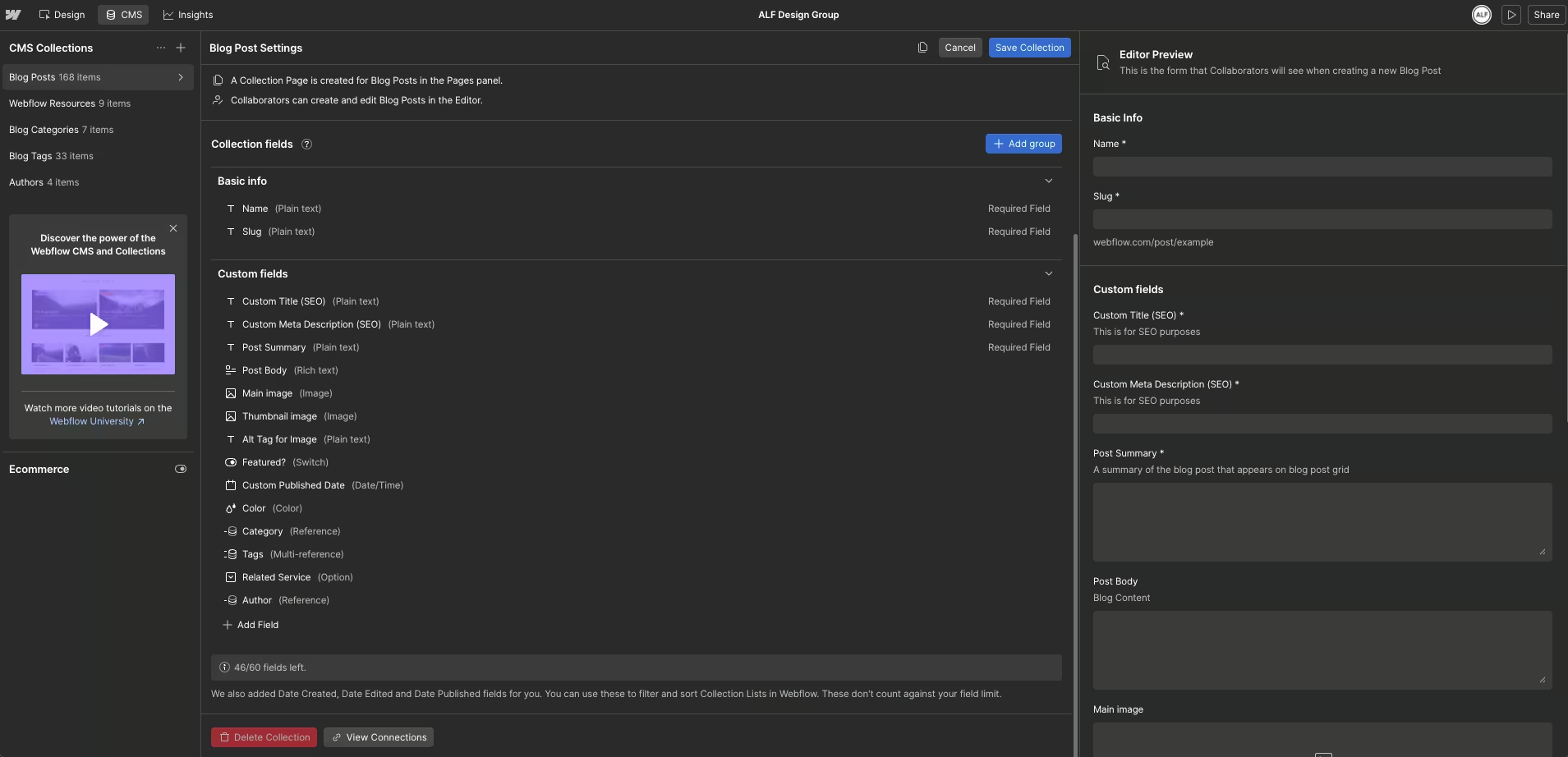
One of the things we like about Webflow is how much control its CMS gives designers and developers over the way content is structured. That flexibility comes with a responsibility. A field called Text 3 might make perfect sense to whoever is building the site that afternoon. It can mean almost nothing to the marketing executive who inherits it a year later. A field called Article introduction, or Author profile image, carries its own context.
Sensible field names, clear structures and reusable patterns all lower how much someone needs to know before they can make routine updates themselves. That is exactly what we are aiming for. We would rather our clients did not have to call us every time they want to publish an article.
So every project includes a training session and a simple handover pack covering the everyday updates. When a client can manage that confidently on their own, we count the handover a success.
Why Can a "Small Website Update" Cost So Much?
This is probably the most common question around maintenance. A client says, "I only need this one thing changed, why does it cost that much?" The honest answer is that the request they can see and the work sitting underneath it are often two different things, and two examples we run into all the time make the point.
Example 1: "Can You Just Change This CMS Category?"
Picture a blog category called Best Practices that the business now wants to call Guides. On a new site with ten articles, that really can be simple: we review the ten, check they still belong under the new name, and make the change.
Ask for exactly the same thing on a site with 1,000 CMS articles, though. The request has not changed. We are still swapping "Best Practices" for "Guides." But the website around it has changed enormously.
We may now need to understand:
- Which CMS items currently use the category?
- Does the category appear in filters or collection lists?
- Are there category landing pages?
- Are internal links affected?
- Are URLs changing?
- Will redirects be required?
- Does the sitemap need attention?
- Are there articles that no longer fit the renamed category?
- What pages may need to be recrawled after the change?
What appeared to be a wording change can become a content architecture and SEO task. This is why website maintenance cannot always be priced according to how long it takes someone to type the new words.
Example 2: "Can You Just Make This a Carousel on Mobile?"
The second one is about responsive layouts. Imagine four cards in a grid, four columns on desktop, stacking one under another as the screen narrows. The client looks at the mobile layout and says, "The page feels too long, can we just make these swipe instead?" It sounds tiny. But it is not a spacing tweak, it is a change of interaction pattern.
That can involve:
- changing the component structure
- creating swipe behaviour
- setting carousel dimensions
- deciding how navigation should work
- handling pagination indicators
- checking tap and swipe interactions
- testing different screen sizes
- reviewing accessibility
- ensuring desktop and tablet layouts remain unaffected
- running QA after implementation
The client's objective is completely reasonable. They want a shorter mobile experience. But a simple outcome does not always mean a simple implementation.
Website maintenance is not priced according to how small the change looks. It is priced according to what has to change underneath it.
What Website Maintenance Actually Includes
Not every site needs the same kind of maintenance. A small corporate site that changes twice a year has almost nothing in common with a content platform shipping several articles a week. Still, ongoing work tends to fall into a handful of areas.
Content Updates
These are the requests most businesses immediately associate with maintenance:
- changing copy
- replacing images
- updating staff profiles
- adding services
- publishing articles
- changing contact information
- updating promotions
- adding new sections
When the site has been structured properly, many of these should be straightforward.
CMS Maintenance
The CMS becomes increasingly important as a website grows. Over time, teams may create new categories, change naming conventions, stop using certain collections or restructure content. Without regular housekeeping, the CMS can become difficult to understand.
And the mess may not be visible to website visitors.
Layout and Responsive Changes
Websites also evolve visually.
A new content requirement might need a different component. A mobile layout may need adjusting. A section designed for three items suddenly needs to accommodate seven. These requests can require actual design and development work rather than simple content editing.
Form and Functionality Checks
A contact form that looked perfect at launch is not particularly useful if submissions stop reaching the right person six months later.
Website maintenance can include periodically checking:
- contact forms
- enquiry flows
- external integrations
- buttons
- links
- downloads
- tracking
- embedded tools
The more integrations a website relies on, the more important this becomes.
SEO Housekeeping
Maintaining a website can also affect search visibility. Removing a page, restructuring a CMS collection or changing URLs should not be treated purely as a design decision.
We may need to consider:
- redirects
- internal links
- indexing
- page titles
- descriptions
- canonicalisation
- sitemap behaviour
- outdated pages
- duplicate content
Website maintenance and SEO are not the same service, but changes to a website can absolutely have SEO consequences.
The Website Can Look Fine and Still Need Maintenance
One of the more interesting maintenance problems we encounter is what happens behind the website.
A client might have CMS collections such as:
- Blog [Current]
- Blog [Unused]
- Guides [Unused]
Sometimes they still hold published pages. The marketing team stops seeing them, visitors rarely land on them, but the URLs still exist and search engines may still know about them.
This is how a website quietly builds up content and technical debt. Someone spins up a new collection instead of tidying the old one. A new hire arrives months later with no idea which is the real one.
Another redesign happens, and eventually nobody will delete anything, because nobody is sure what it will break. From the front the site looks completely normal; underneath, it has become steadily harder to maintain. Good maintenance includes housekeeping, not because everything old is dangerous, but because the site has to stay understandable to the people responsible for it.
Can You Maintain Your Website Yourself?
Absolutely.
In fact, we think businesses should be able to perform routine updates themselves. If a Webflow website has been built well, clients should not need a web designer every time they want to:
- publish a blog article
- update a staff profile
- replace standard content
- add a CMS item
- change information in an approved field
This is why website handover matters.
Being able to edit a site is not the same as every edit being risk-free, though. We have had clients accidentally detach a component and then wonder why the footer on one page suddenly looks different from every other footer.
Another regular one is "why does this image look like this when I upload it?" That is almost always the new image having the wrong dimensions or aspect ratio for the slot it landed in. The CMS makes the upload easy. It cannot make the design judgement for you, and that difference is the whole point.
A maintainable website should make editing easy. Easy editing does not remove the need for design and technical judgement.
Reactive Maintenance vs Ongoing Website Optimisation
There is also a choice to make about the kind of support you actually need, and we tend to see two models.
Reactive Website Maintenance
This is appropriate when the business simply wants someone available to make changes when required. The relationship is request-driven.
The client might ask us to:
- publish something
- change a section
- update a CMS item
- fix a layout
- replace content
- modify a component
The business decides what needs to be done and sends us the request. For organisations without an internal website resource, this can work very well.
Ongoing UX, CRO and Website Improvement
The second model is different. Here, we operate more like an extension of the client's in-house web team.
Instead of waiting for someone to tell us exactly what to change, we may also be looking at:
- UX improvements
- conversion opportunities
- user journeys
- CTA performance
- page behaviour
- SEO opportunities
- new landing pages
- information architecture
- ongoing design improvements
That is a step beyond maintenance. Maintenance asks whether the website is working as intended; optimisation asks how to make it work better. Both are worth paying for, but you should not be paying for the second when all you need is the first.
How Do You Know Which One You Need?
One of the questions we ask prospects is: How do you see your team managing the website after launch?
The answer tells us a lot.
If they tell us: "Our marketing team can update the website internally."
Great. They may not need a traditional maintenance retainer.
Instead, the more useful conversation may be around ongoing UX, CRO or SEO improvements.
But if they say: "Can you help us update the website as and when we need something?" then reactive website maintenance is usually a better fit.
The goal should not be to sell every client the biggest retainer possible. The goal is to understand how the website fits into the organisation.
What Happens When a Website Is Not Maintained?
Website neglect is rarely one dramatic event. More often, problems accumulate.
A redundant CMS collection stays live. Then another collection replaces it. Old articles remain published. A component gets detached. Someone uploads images with inconsistent dimensions.
A tracking script stops working.
A service changes but several older pages still describe the previous offering.
One problem on its own may not matter very much. Over time, however, the website becomes increasingly difficult to trust and increasingly expensive to untangle. This is why website maintenance is better understood as an ongoing discipline rather than an emergency service.
The purpose is not to constantly change the website for the sake of changing it. It is to stop small inconsistencies from becoming structural problems.
How Often Should You Maintain Your Website?
There is no universal maintenance schedule.
A website publishing five articles a week requires more attention than a ten-page corporate site that changes twice a year.
Instead of asking: "Should we maintain the website every month?"
Ask: "How often does our website change?"
Consider:
- how frequently content is published
- how many people edit the website
- how important website leads are to the business
- how many integrations the site depends on
- how large the CMS has become
- how frequently campaigns are launched
- how much revenue depends on the website functioning correctly
The maintenance schedule should follow the operational importance of the website.
Looking for Pricing?
Pricing depends heavily on your website's complexity and support needs. Small brochure sites cost far less to maintain than large CMS-driven platforms with integrations and frequent campaigns. We cover it in full in our dedicated guide to website maintenance cost in Singapore.
One principle worth keeping in mind either way: do not judge the cost of a change by how small it looks on screen. Ask what the change actually affects. That is usually where the work is.
Who Website Maintenance Is (and Isn't) For
Website maintenance makes sense if:
- nobody internally wants to manage website updates
- your team needs reliable support when changes are required
- your website changes frequently
- your CMS is becoming more complex
- website downtime or broken functionality would affect the business
- you want someone familiar with the existing website available when needed
You may not need a maintenance retainer if:
- your website rarely changes
- your internal team can confidently manage routine updates
- your CMS has been structured for self-management
- you mainly need strategic UX, CRO or SEO improvements rather than operational support
In that situation, an ongoing optimisation engagement may be more useful.
Website Maintenance Should Make Your Website Easier to Own
We believe the best maintenance relationship begins with a website that was designed to be maintained. That means reusable components. Clear CMS structures. Fields that make sense.
A proper handover. Training. Documentation.
And a client who understands enough about their website to confidently manage the everyday work themselves. Because the purpose of a website is not simply to exist. It is there to help promote and support the business.
And while your office may close at the end of the day, your website needs to keep doing its job 24/7. That is why website maintenance starts long before the first maintenance request arrives.
It starts on day one of the build.
Frequently Asked Questions About Website Maintenance
Does website maintenance affect page speed or Core Web Vitals?
Yes. Unoptimised images, unused code left behind by old edits, and outdated CMS structures are common causes of slow page speed, and routine maintenance is where these usually get caught.
What's the difference between a bug fix and a routine maintenance request?
A bug is something broken that needs fixing regardless of a maintenance plan. A routine request is a planned change, like updating content or adjusting a layout, that a maintenance plan is built to handle.
Does switching web design agencies affect ongoing website maintenance?
It can. A new team needs time to understand an existing site's CMS structure and components before making changes confidently, so handovers are worth planning for rather than doing in a rush.
Need Help Maintaining Your Website?
If your team simply needs reliable support for website updates, we provide ongoing website maintenance for businesses that would rather have an experienced web team handle changes as they arise. And if your team already manages the website internally but wants to continuously improve its UX, conversion rate or search performance, we can support that too. Explore our Website Maintenance Services
{{build-better-experience="/directory"}}
Categories
Written By

Resources
Related Articles
Deep dive into our latest news and insights.
.webp)