Webflow vs Wix: Which Website Builder Is Right for You?
Webflow vs Wix: What are the main differences between Webflow and Wix?
Table of contents
Free Website Audit
We'll personally review your website across 6 areas. UX, SEO, performance, mobile, conversion, and send you a detailed, actionable report within 48 hours. No cost. No catch.
Webflow and Wix are both capable website builders, but they are built for very different audiences. Wix prioritises ease of use — its drag-and-drop interface and AI-assisted setup make it accessible to beginners and small businesses looking to get online quickly with minimal technical friction. Webflow, by contrast, is a professional-grade platform that gives designers and development teams pixel-perfect control over layout, interactions, and code — without sacrificing the visual editing experience. This comparison covers pricing, design flexibility, SEO capability, responsive design, CMS functionality, and scalability to help you make the right choice for your specific situation.
Introduction: Two Very Different Tools
We have been building websites on Webflow for years at ALF Design Group, and one of the questions we hear most often from prospective clients is: "Should I use Webflow or Wix?" It is a fair question, and we want to give you an honest answer — not a sales pitch. We previously published a detailed comparison of Webflow vs WordPress, and this article applies the same approach to Wix.
Both platforms allow you to build a website without writing code from scratch. But they make very different trade-offs, and the right choice depends almost entirely on what you are trying to build, how much control you need, and where you expect to take your website over the next few years.
At a Glance: Webflow vs Wix
1. Pricing: Which Platform Offers Better Value?
Pricing is typically the first filter people apply when evaluating website builders, and on the surface, Wix and Webflow are broadly comparable at the entry level. However, the comparison becomes more nuanced when you factor in what each plan actually includes.
Wix Pricing
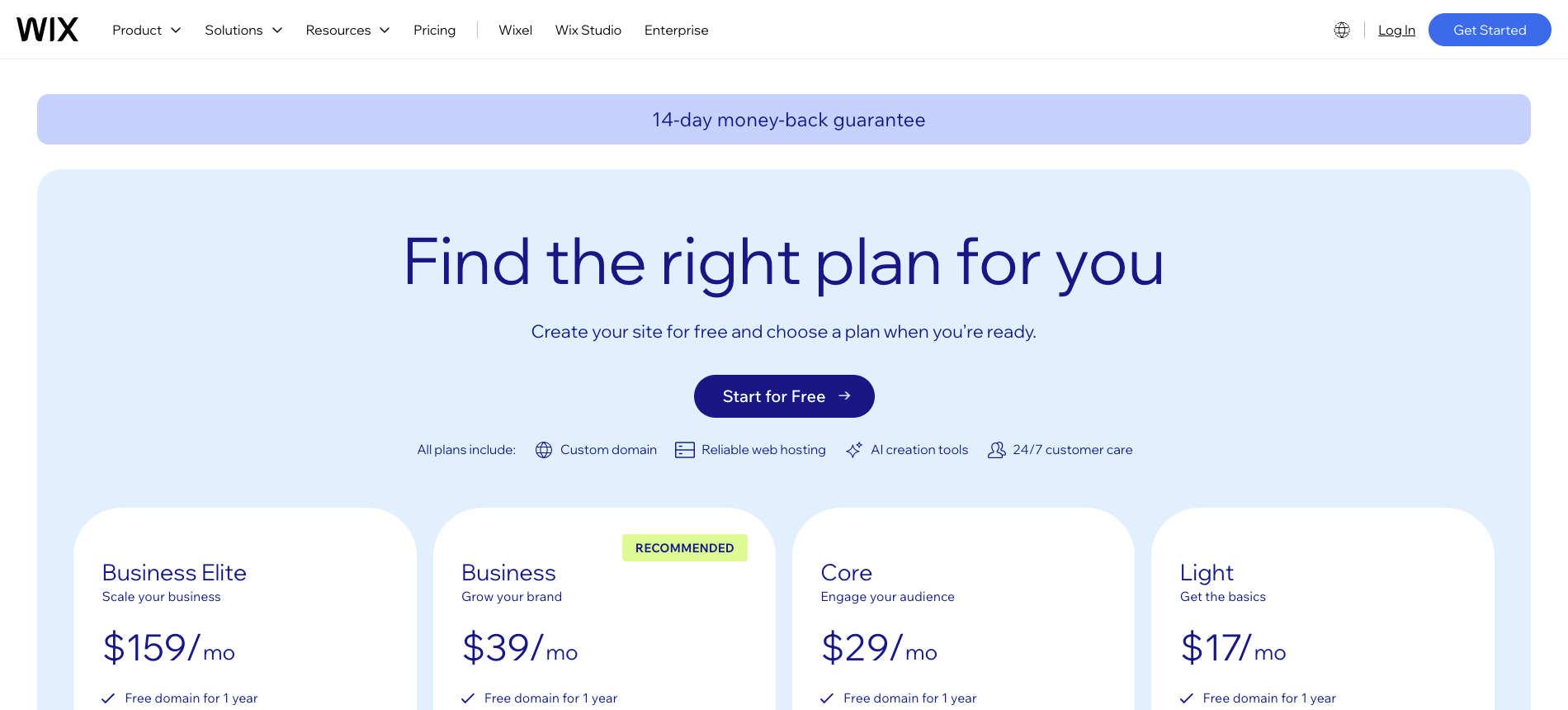
Wix offers a free plan, but it includes Wix-branded adverts on your site and does not allow you to connect a custom domain — making it unsuitable for business use. Paid plans start from around US$17/month (Light) for basic personal or portfolio sites, rising to US$36/month (Core) for e-commerce and business features. The Business and Business Elite plans, designed for growing stores and high-volume traffic, go higher still.
Wix's pricing is generally considered accessible, and you get a reasonable feature set at each tier without hidden costs for hosting or SSL.
Webflow Pricing

Webflow also offers a free plan for building and prototyping, but you need a paid plan to publish to a custom domain. Site plans start from US$14/month (Basic) for simple informational sites, moving up to US$23/month (CMS) for blogs and content-driven sites. If you are building a client site or need the full staging and white-labelling features available through a Workspace plan, the cost structure shifts.
Webflow is not the cheapest option on the market, but the value proposition is different: you are paying for professional-grade infrastructure, clean code output, and a design system that scales. For businesses that take their digital presence seriously, this is usually money well spent.
Verdict on Pricing
Wix wins on affordability for basic use cases. Webflow offers better long-term value for businesses that need scalability, custom design, and serious SEO performance.
2. Ease of Use: Wix Has the Lower Barrier to Entry
This is where Wix has a genuine advantage. From the moment you sign up, Wix guides you through a simple onboarding flow — asking what type of website you are building, suggesting relevant templates, and offering its ADI (Artificial Design Intelligence) tool to generate a personalised layout based on your answers. For someone building their first website, this experience is genuinely smooth.
Webflow takes a different approach. When you log in, you are brought directly into the Designer — a visual canvas that gives you full control over every element on the page. It is a powerful environment, but it can be overwhelming if you have not spent time in professional design tools like Figma or Adobe XD. Webflow University — their free learning hub with structured courses and certifications — is excellent, and it is how many of our team first learnt the platform.
The honest summary: if you have never built a website before and want to launch something within a day or two, Wix is the easier starting point. If you have a design background or are working with a professional agency, Webflow's interface will feel intuitive and far more capable.
Wix wins on ease of use for non-designers. Webflow wins for professionals who want real control and are willing to invest time in learning the platform.
3. Design Flexibility: Webflow Is in a Different League
This is arguably the most significant difference between the two platforms, and it is where Webflow's value proposition becomes clearest.
Wix is a template-based builder. You choose a template, customise it within the available constraints, and that is broadly what your site will look like. Some customisation is possible — you can change colours, fonts, layout to a degree, and reorder sections — but you are always working within the bounds of what the template allows. This is a deliberate design choice that makes Wix accessible, but it places a ceiling on what is achievable.
Webflow gives you a blank canvas. Every element — its position, dimensions, margins, padding, animations, interactions, and states — is fully configurable. You can build from scratch, start from a cloneable template (which you then own completely), or import a design directly from Figma. There are no invisible constraints imposed by a template system.
At ALF Design Group, we use a Figma-to-Webflow workflow to ensure that every site we build matches the approved design precisely — no visual compromises. This level of fidelity is simply not achievable in Wix.
If you want to understand what bespoke Webflow design looks like in practice, our portfolio shows a range of client projects built on the platform.
Webflow wins on design flexibility — by a wide margin. If your brand, credibility, or conversion rate depends on the quality of your website design, this factor alone often makes the decision.
4. SEO: Webflow Gives You More to Work With
Both Webflow and Wix have invested heavily in their SEO tooling over the past few years, and both allow you to manage meta titles, meta descriptions, alt tags, and sitemaps. However, there are meaningful differences at the technical level that matter for competitive search performance.
Where Webflow Has the Edge
- Clean, semantic HTML output without bloated or redundant code
- Full control over heading hierarchy, canonical tags, and URL structure
- Native support for structured data and schema markup
- Built-in 301 redirect management
- Page-level performance optimisation with automatic minification and CDN delivery
- No reliance on third-party SEO plugins that can conflict or break
Where Wix Has Improved
- Wix's SEO Wiz provides guided setup for beginners
- Integration with Google Search Console
- Automatic sitemaps and structured data for blog posts
- Improved page speed scores in recent years
That said, Wix sites tend to generate more bloated HTML than Webflow, and you have less granular control over technical SEO elements. For competitive markets where on-page technical optimisation matters — which increasingly includes Singapore's business-to-business sector — Webflow's cleaner architecture gives you a meaningful advantage. Read our article on how Webflow SEO helps Singapore businesses rank higher for a deeper breakdown.
Webflow wins on technical SEO. Wix is adequate for basic requirements but falls short when you need full control over the technical signals that influence search rankings.
5. Responsive Design: Webflow Handles Multi-Device With Precision
Responsive design is non-negotiable in 2026. The majority of web traffic — and an even higher proportion in Singapore, where mobile internet usage consistently exceeds desktop — arrives from smartphones and tablets. Your website must perform and look well across all screen sizes.
Wix is responsive to a degree, but the platform was not originally architected for multi-device design. You will frequently find yourself making manual adjustments to the mobile layout to compensate for spacing and alignment issues that do not transfer cleanly from desktop. Wix offers a separate mobile editor, which helps, but it is a workaround rather than a native solution.
Webflow was built with responsive design as a core feature. You design across multiple breakpoints — desktop, tablet, landscape mobile, and portrait mobile — and each can be adjusted independently with full visual control. This saves significant time in a professional build context and produces better SEO and user experience outcomes compared to template-based responsive approaches.
Webflow wins on responsive design. The multi-breakpoint editor is far superior to Wix's mobile adjustment workflow.
6. CMS and Content Management: Webflow Scales, Wix Stays Simple
If your website involves regularly published content — blog posts, case studies, team profiles, product listings, or any structured collection — the CMS capability of your chosen platform will matter a great deal. We wrote a detailed breakdown of what Webflow CMS can do if you want the full picture.
Wix's CMS is functional and easy to use. You can create content collections and display them in a grid or list format using their dynamic pages feature. For simple use cases — a blog, a portfolio, a basic product listing — it does the job.
Webflow's CMS is considerably more powerful. Content models can have multiple field types, reference fields that link collections together, and multi-image fields. The design of collection pages is fully customisable in the Designer, giving you complete control over how content is presented. For content-heavy sites or businesses with complex structured content needs, this flexibility is significant.
One notable limitation to acknowledge: Webflow's CMS has an item limit (up to 10,000 items on the Business plan), which rules it out for very large catalogue-driven sites. For most business and marketing websites, however, this is rarely a constraint.
Webflow wins for content-driven sites needing structured, scalable CMS architecture. Wix is fine for simpler content needs with limited volume.
Webflow vs Wix for Singapore Businesses
For Singapore-based businesses evaluating these two platforms, the decision often comes down to what stage the business is at and what the website needs to accomplish.
Wix is genuinely useful for sole proprietors, hawker businesses, tutors, and freelancers who need a simple, low-cost web presence with basic contact information and a portfolio. If getting online quickly with a tight budget is the priority, Wix can absolutely serve that purpose.
However, for SMEs and growth-stage companies in Singapore — particularly those in competitive sectors like professional services, fintech, education, or e-commerce — the limitations of Wix become apparent quickly. When your competitors have well-designed, fast, SEO-optimised Webflow sites, a Wix template starts to feel like a significant disadvantage.
There is also the question of credibility. Singapore's business community is digitally sophisticated. A client researching a professional services firm, a law practice, or a B2B SaaS company will notice the difference between a template and a bespoke website — even if they cannot articulate why.
If you are a Singapore business weighing a move from Wix to a more capable platform, our guide on how to choose a web design agency in Singapore is a useful starting point. We also offer a free website audit if you want an objective assessment of where your current site stands.
When to Choose Wix
- You are building a personal portfolio, hobby site, or simple small business page
- You have no design background and want to launch within a day or two
- You have a very limited budget and need a functional web presence quickly
- Your website is unlikely to grow significantly in complexity over time
- You do not need advanced SEO, custom integrations, or a sophisticated CMS
When to Choose Webflow
- You are building a professional business website where design quality and brand credibility matter
- You need full SEO control and want clean, semantic code output
- Your site will grow in complexity — more pages, content types, integrations, or features
- You are working with a designer or agency who will build in Webflow
- You need a CMS that non-technical team members can use independently post-launch
You want to understand the full range of what the platform offers — our article on whether Webflow is worth it covers this in depth.
Frequently Asked Questions: Webflow vs Wix
Is Webflow better than Wix for SEO?
Yes, in most practical scenarios. Webflow produces cleaner HTML, gives you full control over technical SEO elements including canonical tags, structured data, and URL structure, and loads faster on average due to its CDN infrastructure. Wix has improved its SEO features significantly in recent years and is adequate for basic requirements, but Webflow provides more depth for competitive rankings. See our article on Webflow SEO for Singapore businesses for specifics.
Can I migrate from Wix to Webflow?
Yes, though it is not an automated one-click process. Content can be exported from Wix and imported into Webflow, but the design will need to be rebuilt — which is usually a good thing, since it gives you the opportunity to produce a better-designed site from scratch. We assist clients with Wix-to-Webflow migrations regularly at ALF Design Group.
Which is easier to use — Webflow or Wix?
Wix is meaningfully easier for beginners. Its ADI onboarding, drag-and-drop editor, and template library make it approachable for someone building their first website. Webflow has a steeper initial learning curve, but Webflow University offers excellent free courses that can bring a motivated learner to proficiency relatively quickly. For professional designers, Webflow's interface will feel more natural than Wix's.
Is Webflow more expensive than Wix?
At entry-level tiers, Webflow and Wix are broadly comparable. Wix's paid plans start slightly higher in practice for business-grade features (US$17/month vs Webflow's US$14/month for Basic). The cost difference becomes more pronounced at scale, where Webflow's workspace pricing for agencies and larger teams can be higher. For individual business sites, the pricing difference is rarely the deciding factor.
Does Wix support custom code like Webflow?
Wix supports custom HTML, CSS, and JavaScript through its Velo development platform, which is available on paid plans. However, the implementation is more constrained than Webflow's approach, which gives you direct access to the underlying code and lets you embed custom elements anywhere on the page. For developers and agencies, Webflow's custom code capabilities are substantially more flexible.
Which platform is better for e-commerce?
Wix has a more accessible e-commerce setup and is easier for beginners to configure a basic online store. Webflow Commerce is capable and produces better-designed storefronts, but requires more technical know-how. For high-volume, catalogue-heavy e-commerce, neither Webflow nor Wix is the ideal solution — dedicated platforms such as Shopify are better suited.
Should Singapore businesses use Webflow or Wix?
It depends on the scale and ambitions of the business. For simple low-budget web presences, Wix works. For SMEs and growth-stage companies that want a credible, SEO-optimised, and scalable website, Webflow is the stronger platform — especially when built by an experienced Webflow agency in Singapore.
Conclusion
Wix and Webflow are both legitimate website platforms, and neither is objectively better in all situations. The right choice depends on your goals, your budget, your technical comfort level, and the expectations your audience has of your brand.
If you are a beginner building a simple site quickly, Wix is a perfectly reasonable starting point. If you are a business that takes its digital presence seriously — where design quality, SEO performance, and long-term scalability are genuine priorities — Webflow is the more capable and rewarding platform to build on.
At ALF Design Group, we build exclusively on Webflow because it gives us the control and precision to produce websites that perform. If you are considering a new website or a migration from Wix, get in touch with us — we would be happy to advise on the right approach for your business.
{{build-better-experience="/directory"}}
Categories
Written By

Resources
Related Articles
Deep dive into our latest news and insights.


.png)
