Landing Page Optimisation Mistakes to Avoid
The 10 landing page mistakes that kill conversions — and how to diagnose and fix each one for better results.
Table of contents
Free Website Audit
We'll personally review your website across 6 areas. UX, SEO, performance, mobile, conversion, and send you a detailed, actionable report within 48 hours. No cost. No catch.
Most landing pages that underperform aren't failing because of weak products, low traffic, or poor targeting. They're failing because of small, correctable design and UX decisions that add friction at the exact moment a visitor is deciding whether to act. If your landing page is getting traffic but not converting, the cause is almost always one of a small, recognisable set of mistakes, not the product and not the audience.
There's a specific kind of frustration that comes from a landing page that won't convert. The traffic is there, the analytics confirm it. The product is right, your existing customers tell you so. But the page just sits there, taking visits and producing almost nothing. The problem is almost never the product or the audience. It's the page.
The mistakes behind this are well documented and repeat constantly across the market. They're not exotic, they're recognisable failure patterns that show up in most underperforming landing pages, often stacked together, and every one of them is fixable, usually without a full redesign. This guide assumes you already have a page live and underperforming. If you're starting from scratch, my guide to building a high-converting landing page is the better starting point, and for the full optimisation framework beyond just the mistakes, see landing page optimisation.
The 10 Landing Page Mistakes That Kill Conversions
Mistake 1: No clear single conversion goal

The most fundamental landing page error is trying to do too much with one page. A page asking visitors to sign up for a newsletter, book a consultation, download a guide, and follow you on LinkedIn isn't a landing page, it's a homepage with a narrow URL. Every extra goal competes with every other goal, and the result is that none of them convert well.
One page, one goal, one CTA isn't a stylistic preference, it's the most consistently documented principle in landing page research. A visitor facing a single clear action makes a binary decision: do this, or leave. A visitor facing multiple options gets a multi-step evaluation task that most people resolve by doing nothing.
Diagnostic: more than one primary CTA button, or removing the nav would reveal several ways to leave without converting, means the page has a goal clarity problem. Fix it by identifying the single most valuable action and removing or subordinating everything that competes with it.
Mistake 2: Weak or generic CTA copy
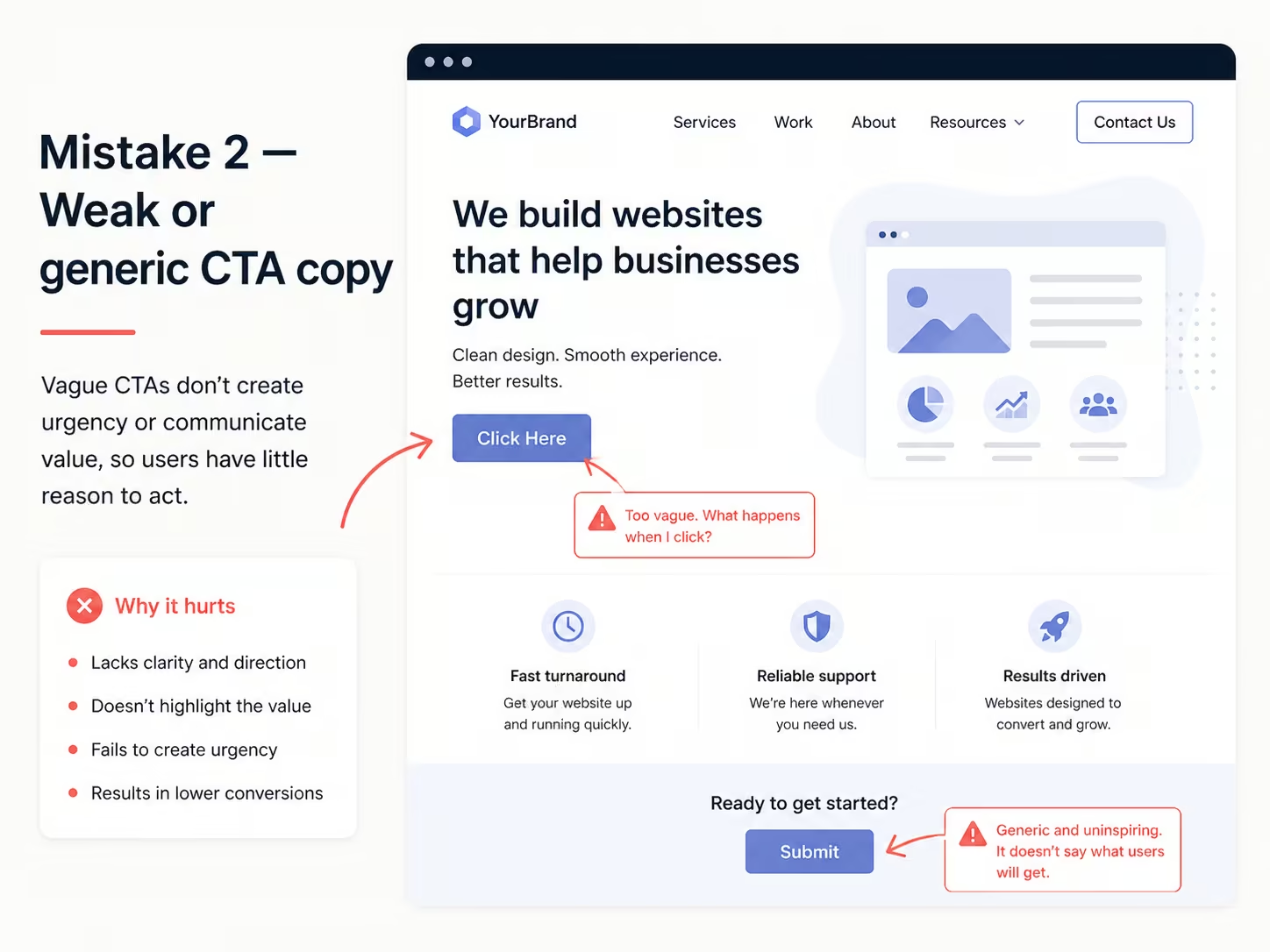
The CTA button is the conversion mechanism of a landing page, and its copy matters more than most businesses realise. Generic labels ('Submit,' 'Click Here,' 'Learn More,' 'Send') are conversion friction in linguistic form. They describe the action rather than the outcome, which leaves the value of clicking unclear.
Outcome-specific CTA copy consistently outperforms generic alternatives: 'Get My Free Audit,' 'Start My 14-Day Trial,' 'Book My Strategy Session,' 'Download the Singapore Market Report' all tell the visitor what they'll have after clicking, which cuts the uncertainty that stops clicks. First-person phrasing ('Show Me My Report' over 'Show You Your Report') pushes this further and beats second-person copy in most A/B tests.
Diagnostic: read your CTA copy on its own, with no surrounding context. If it doesn't clearly say what the user gets, rewrite it. Test outcome-specific alternatives with a structured approach, my guide on landing page A/B testing covers the methodology.
Mistake 3: No clear value proposition above the fold

A visitor who lands on a page and can't tell within five seconds what it offers and why it's worth their attention will leave. That's not impatience, it's how people evaluate information. The above-the-fold section, whatever's visible without scrolling on the device they're using, is the first and often only chance to answer their real question: is this relevant to me and worth my time?
The most common failure here: the headline states the business name or tagline instead of the specific value the visitor gets. 'Award-Winning Digital Marketing Agency' tells them nothing. 'Double your lead volume in 90 days or we refund the difference' tells them exactly what they get, with a specific, credible claim behind it. A stronger above-the-fold value proposition gets users to scroll further, and the further they scroll, the more likely they are to convert.
Diagnostic: run a five-second test, show the page to someone unfamiliar with the business for five seconds, then ask them to describe what it offers. If they can't answer specifically, the value proposition isn't clear enough. For the copywriting behind strong headlines, see my guide on landing page copywriting tips that convert.
Mistake 4: Ignoring mobile responsiveness
In Singapore, where smartphone penetration is above 90% according to Statista, a landing page with a poor mobile experience is failing most of its audience before they even engage with the content. The specific failures that most reliably kill conversion: text that needs zooming to read, CTA buttons too small to tap comfortably (under 44px), forms that force a keyboard switch because input types aren't specified, and layouts that need horizontal scrolling.
Mobile should be designed first, not adapted from desktop. A desktop page squeezed into a smaller viewport isn't a mobile experience, it's a legibility problem. For most Singapore landing pages running paid traffic, mobile is where most of the clicks land. Skip giving it the same design care as desktop and the campaign is partly wasted before it starts. My full guide on mobile landing page optimisation for Singapore businesses covers this in depth.
Mistake 5: Slow page load speed
Every extra second of load time past two seconds is tied to a measurable drop in conversion. Singapore users on 4G and 5G connections expect fast digital performance, so a page taking four or five seconds to become usable will lose many visitors before it even loads, especially when they've arrived from a paid ad with high intent and low patience.
The usual causes: oversized, uncompressed hero images (desktop-resolution images served to mobile users), JavaScript that loads synchronously and blocks rendering, web fonts that delay text display, and video backgrounds loading full-resolution files with no compression. All of this shows up in Google PageSpeed Insights, which gives specific fixes for each. My guide on how to optimise your website's speed has the full technical checklist.
Mistake 6: Insufficient or unconvincing social proof
Social proof lowers the perceived risk of converting. A visitor who's never heard of a business is making a trust decision alongside a conversion decision, and without evidence that other people made the same choice and were satisfied, the risk calculation usually lands on doing nothing. Testimonials, client logos, review ratings, case study outcomes, and usage statistics all address that calculation directly.
The failures that undercut it most: generic, unattributed testimonials ('Great service! J.S.'), numerical claims with no source ('10,000 satisfied customers,' unverified), and social proof placed only at the bottom of the page, after the conversion point, instead of next to the CTA where it actually reduces hesitation.
For Singapore businesses, local credibility carries particular weight: testimonials from named people at recognisable Singapore companies, references to local clients, and certifications relevant to Singapore's regulatory environment all build more trust locally than generic international proof.
Mistake 7: Forms that ask for too much too soon
Form field count is one of the most directly measurable conversion variables on a landing page. Every extra field taxes the user's time and asks for information many people won't share until trust is established. A standard lead-gen form needs a name, an email, and maybe one qualifying question. Asking for phone number, job title, company size, and budget before you've shown any value converts at a lower rate than a shorter form, every time.
The fix isn't collecting less information, it's sequencing it properly. Capture the minimum for first contact, then gather the rest through the follow-up conversation. This is sometimes called progressive profiling, and it consistently lifts initial conversion without hurting lead quality later. My guide on form UX best practices has the full framework.
Mistake 8: No analytics or heatmap tracking
A landing page without analytics is a conversion machine with no feedback loop. You can't diagnose what's failing, or confirm what's working, without data on how people behave on the page. The minimum setup: a conversion event on the goal action, a scroll depth measure, and a traffic source breakdown attributing conversions to specific campaigns.
Heatmaps and session recordings add a qualitative layer aggregate analytics can't provide. They show where people click, where they click expecting something interactive that isn't there, how far they scroll, and where they abandon the page. A page where 60% of visitors leave before the form is a completely different problem from one where they reach the form and don't finish it, and heatmap data is what tells the two apart.
Mistake 9: Navigation links that let users leave
A landing page with full site navigation, header nav, footer links, related content suggestions, is a page with multiple exits. Every link that takes a visitor away before they convert is a conversion lost. The whole point of a landing page is to remove every option except converting or leaving.
This is what actually separates a landing page from a normal website page. Website pages need comprehensive navigation because they serve people who are exploring. Landing pages shouldn't have navigation because they serve people who already got enough context from the ad or email that sent them, and are being asked to make one specific decision. Strip the navigation and test it against the version that has it, and you'll almost always see a measurable lift.
Mistake 10: Mismatched message between ad and landing page
Message match is how well the copy and promise in an ad or email lines up with the content on the landing page it links to. A user clicks an ad promising 'a free Webflow audit' and lands on a generic agency services page: that's a message mismatch. The specific promise hasn't been kept, which kills trust and triggers immediate abandonment.
This is one of the most common and costly landing page errors in paid campaigns, especially for businesses running several ad variants into one generic page. Ideally, each distinct ad promise gets its own matching landing page. Where that's not realistic, the minimum is making sure the headline and above-the-fold content echo the ad's key claim directly.
How to Audit Your Landing Page for These Mistakes
A structured audit catches problems before they compound. Run through this quarterly for active pages, and before launching any new paid campaign.
- Check message match: confirm your headline directly reflects the primary promise of the ad or email sending traffic to it. Check each variant if you're running more than one.
- Run a speed test: use Google PageSpeed Insights to check mobile and desktop Core Web Vitals. Below 50 on mobile is a conversion risk. Note every specific flag it raises.
- Test mobile on a real device: open the page on an actual phone, not a browser resize tool. Check CTA tap size, keyboard types, and whether the value proposition shows without scrolling.
- Verify analytics firing: use GA4's real-time view to confirm your conversion event fires when the goal action completes. If it's silent, so is your conversion data.
- Review form field count: for each field, ask if it's strictly necessary for first contact. Remove or defer anything that isn't.
- Check social proof placement: confirm at least one proof element sits within view of the primary CTA. If it's all below the fold, move the strongest piece up.
- Remove unnecessary navigation: confirm there's no header nav or footer links pulling users away from the conversion action. If there is, test a nav-free version.
Quick Fix Reference: Each Mistake at a Glance
The pre-launch checklist in my main optimisation guide covers everything a launch needs to clear. This table is narrower on purpose: one fix, tied directly to each mistake above, so you can act on whichever one you just recognised.
Frequently Asked Questions
Which landing page mistake has the biggest impact on conversion rate?
It varies by page, but the single highest-impact change across most underperforming pages is clarifying the value proposition. A headline that says clearly what the visitor gets, specific, benefit-led, matched to the ad that sent them there, consistently beats one that makes people guess. If you can only fix one thing, start there. CTA copy is usually the second highest-impact fix.
How do I know if my landing page is underperforming?
Benchmark against your context: B2B lead gen pages typically convert at 2 to 5%, e-commerce product pages at 1 to 3%, webinar or event registration at 20 to 40%. Below the low end of your relevant benchmark means there's a real problem. From there, the data usually tells you where: high bounce points to message match or above-the-fold clarity, visitors reaching the form but not finishing points to form friction, low scroll depth points to an above-the-fold failure.
Should a landing page have navigation?
No, not for a page built to convert paid or campaign traffic. I cover why in mistake nine above: every nav link is another way to leave before converting. The one exception worth making deliberately is a logo linked back to your homepage, everything else on the page should point at the one action you want.
How often should I test and update my landing pages?
Pages carrying meaningful paid traffic should be in continuous testing, one variable at a time, at a cadence your traffic volume can actually support statistically. Lower-traffic pages just need a quarterly structured audit. A major change to your offer, audience, or competitive landscape should trigger a review immediately, regardless of schedule.
What is message match and why does it matter?
It's how closely the ad, email, or link that brought someone to your page matches what's actually on it. Break that promise and you break the implicit contract of the click, trust drops and people leave. I go into this in mistake ten above; the short version is your headline should echo the ad's claim directly, visible without scrolling.
Can a slow landing page really kill conversions?
Yes, and it's not a small effect. Speed is one of the most reliably measurable levers on this list, often worth more to conversion than a design tweak. A page that takes four or five seconds to load on a Singapore mobile connection is likely losing visitors before they ever see the offer, and every one of those was a paid click. Fixing this is frequently the cheapest win in this whole guide.
How many fields should a landing page form have?
As few as your process genuinely needs, usually three to four for a standard lead-gen form. I cover the sequencing approach in mistake seven above; the short version is capture the minimum for first contact and collect the rest later, rather than asking for everything up front.
Conclusion
If you're looking at your own landing page right now, the fastest diagnostic is this: pick the single mistake from this list that sounds most familiar, and check it first. It's rarely more than two or three of these at once.
Work through the audit framework above in order, fix what it turns up, then run your page against the pre-launch checklist in the main guide before your next launch. A well-targeted fix beats a full redesign that touches everything without prioritising anything.
I build landing pages in Webflow that are designed to convert from the first version: message match, mobile-first design, and performance sorted before launch, not after. If your current pages aren't converting at the rate your paid traffic deserves, speak to me directly and I'll tell you where the page is actually losing people.
{{build-better-experience="/directory"}}
Categories
Written By
.webp)
Resources
Related Articles
Deep dive into our latest news and insights.