Improving Designer–Developer Partnerships: A Strategic Guide for UX Teams
UX designers, here's how to build stronger, smarter workflows with your dev team — based on ALF's proven approach.
Table of contents
Free Website Audit
We'll personally review your website across 6 areas. UX, SEO, performance, mobile, conversion, and send you a detailed, actionable report within 48 hours. No cost. No catch.
You have seen it before. The perfect Figma file. Then the dev build goes live — and something is off. Not because anyone made a mistake, but because the collaboration never really clicked. At ALF Design Group, we have seen firsthand how successful designer–developer partnerships drive better product outcomes, reduce delivery friction, and foster genuine innovation. Yet too often, the handoff between design and development feels more like a baton drop than a relay. Miscommunication at handoff is not just a workflow inconvenience — it creates rework, erodes trust between teams, and produces products that fall short of what the design intended. This article offers a strategic framework for UX designers who want to lead the charge in building better partnerships. It covers how to rethink handoffs, build a shared language, prototype early, co-create rather than just collaborate, and navigate the specific dynamics of design-dev relationships in Singapore's agency and product team environment.
Why Designer–Developer Collaboration Breaks Down
The gap between design and development is not a tools problem. It is a communication and process problem. Designers and developers often approach the same project with fundamentally different priorities: designers optimise for consistent, elegant user experiences, while developers prioritise performance, feasibility, and stability. Neither perspective is wrong — but without a shared working rhythm, they can produce serious friction.
According to Figma's official guide to developer handoff, effective collaboration between designers and developers is make-or-break for product teams. Handoff — the process of going from design to build — is where these differences become most apparent. When teams operate in silos, developers receive a "complete" design file with little context, assumptions are left unstated, and weeks of rework follow.
The most common failure modes we see at ALF Design Group:
- Designers treating handoff as a finish line rather than the start of a collaboration phase
- Developers discovering technical constraints only after designs are finalised
- Misaligned expectations about what is feasible within the delivery timeline
- Design systems that exist in one tool but are not documented in a way developers can use
- No shared forum for designers and developers to challenge each other's decisions
These are not signs of bad team members. They are signs of a collaboration model that was designed for an older, more sequential way of working. The shift to a more integrated approach — where designers and developers work alongside each other throughout the project, not just at the handoff moment — is what changes the outcome.
For Singapore design and product teams specifically, this challenge is compounded by the reality that many organisations run lean teams where designers and developers wear multiple hats. The pressure to move quickly often means collaboration shortcuts are taken that create bigger problems later. Understanding how to collaborate well is not just a soft skill — it is a strategic efficiency advantage.
1. Rethink Handoffs: From Transaction to Collaboration
Most design teams treat handoff as a finish line. In reality, it is just the beginning of a crucial collaboration phase. The transactional model of handoff — where a designer delivers a completed file and the developer implements it — was already strained before the shift to Agile and continuous delivery. In today's iterative development environments, it is genuinely counterproductive.
Why Traditional Handoffs Fail
The traditional handoff model fails because it assumes design decisions are complete and correct before development begins. In practice, they almost never are. Developers routinely identify constraints that affect design — responsive breakpoints that the design did not account for, animation timings that are computationally expensive, form validation logic that requires a different UX structure, or API response times that affect loading states.
When these discoveries happen mid-build rather than mid-design, the cost is high. The design must be revised, the developer must rework completed code, timelines slip, and both teams feel frustrated by what feels like avoidable rework. The real root cause is not incompetence — it is the sequencing of conversations that should have happened together, happening separately instead.
What to Do Instead
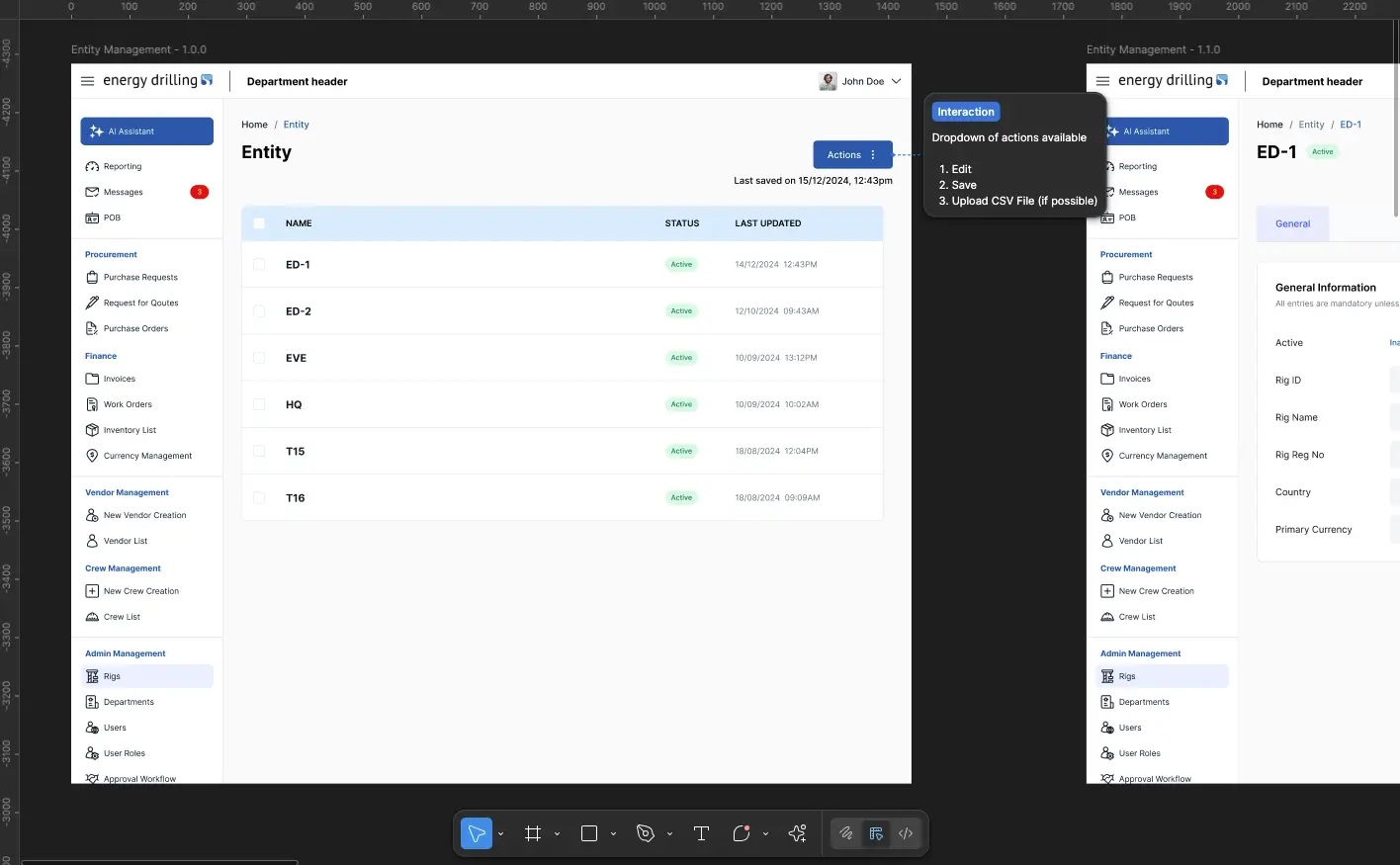
At ALF, we conduct joint walkthroughs of all finalised screens before handoff. Not only do we clarify edge cases and user flows — we actively flag potential technical constraints together. This means developers are present in design review sessions, not just receiving a Figma link at the end of the design phase.
The walkthrough has a specific structure. We go page by page, interaction by interaction. The designer explains the intent. The developer flags any concerns. Both annotate the Figma file together. Edge cases are documented: empty states, error states, loading states, responsive behaviour at each breakpoint. Hover states, focus states, and transition timings are called out explicitly rather than left to interpretation.
The goal is not to slow down the design process. It is to front-load the conversations that would otherwise happen mid-build — where they are far more expensive to resolve. Tools like Figma and Webflow are not just for showcasing work. They are a shared language. Treat handoff meetings as collaborative rituals, not checkbox exercises.
2. Build a Shared Language with Systems and Tools
You cannot collaborate effectively if you are speaking different dialects. A designer who calls a colour "primary blue" while the developer references it as "#1F3864" and the product spec calls it "brand navy" is not a trivial inconsistency — it is the kind of ambiguity that compounds into real delivery errors. That is where a shared design system becomes mission-critical.
Eliminate Ambiguity at Every Level
A design token for "primary blue" should not be called five different names across projects. Button hover states should be documented, tested, and reused — not re-decided by each developer for each new page. Typography scales should be defined in one place. Spacing values should follow a system, not be eyeballed from mockup to mockup.
At ALF, we have found that consistent naming, documented states, and clear usage rules prevent at least 70% of avoidable questions during development. When a developer can look at a Figma component and immediately understand its variants, states, and correct usage context, the back-and-forth that eats into delivery time disappears.
The Tool Stack That Supports Collaboration
The right tool stack creates a single source of truth that both designers and developers can access and contribute to. Here is how we think about the stack at ALF:
Creating a single source of truth reduces friction, especially when new team members onboard. When the design system, documentation, and project management all live in connected tools with consistent naming, there is no version confusion and no lost context. For Figma-specific plugins that support this workflow, see our curated plugin guide.
3. Prototype Early to Prevent Misfires
Designers often wait until pixel-perfect mockups are complete before involving developers. That is a costly mistake — and one that the best design teams have largely moved away from. Involving developers at the prototype stage, not the polished-design stage, changes the quality of feedback and the efficiency of the build.
Why Early Involvement Changes the Outcome
When developers see a prototype early — even a rough one — they raise concerns about animations, responsiveness, and logic before time has been invested in refining a design that may need to change. Everyone aligns on what is being built before work begins. There is less of the expensive cognitive dissonance of a developer who has to mentally translate a static Figma frame into a dynamic, responsive, stateful product.
At ALF, we build interactive prototypes of core flows early — even when they are rough. Developers sit in on usability tests. When you give developers a seat at the table early, their contributions elevate both the code quality and the user experience. A developer who has watched a user struggle with a navigation pattern understands why the UX decision was made in a way that a developer reading a spec never quite does.
Prototyping in the ALF Workflow
In practice, this means we prototype the highest-risk flows first — not the simplest ones. The flows where the interaction is complex, where the user journey involves multiple states, or where the technical implementation is uncertain are the ones that benefit most from early prototyping and developer input.
We use Figma for interactive prototyping and Webflow for higher-fidelity motion previews when the interaction needs to be closer to the live product. The choice of tool depends on what question we are trying to answer: if the question is about UX flow, Figma is faster. If the question is about how an animation will actually feel in the browser, Webflow gives a more reliable answer. For a deeper look at this prototyping approach, see our guide on the UX design process at ALF.
4. Co-Create Rather Than Just Collaborate
There is a meaningful difference between collaboration and co-creation. Collaboration means two roles working alongside each other on their respective parts of a shared project. Co-creation means those two roles actively contributing to each other's domain — a designer raising a question about code performance, a developer suggesting a UX pattern that reduces complexity, both parties arriving at a solution neither would have reached alone.
The Innovation Sweet Spot
The best designer–developer partnerships produce ideas that surprise both parties. A designer may propose a transition animation, and the developer suggests an approach that achieves the same visual effect with a fraction of the computational weight. A developer might identify a form validation pattern that handles an edge case the design overlooked — and that edge case turns out to significantly improve the user experience.
At ALF, we host regular design-dev syncs that are deliberately unstructured. No agenda. No deliverables expected. Just time to experiment, question decisions that were made weeks ago, and explore better solutions together. It is remarkable how a 30-minute session of this kind can replace fifteen Slack threads and three separate change requests. The conversations that happen in those sessions are the ones that produce the most durable design decisions.
How to Encourage Co-Creation on Your Team
Co-creation does not happen by accident. It requires psychological safety — a team environment where a developer feels comfortable questioning a design decision and a designer feels comfortable saying "I do not know if that is feasible, let us figure it out together." This is a culture question as much as a process question.
Practical ways to build this culture:
- Include developers in design critique sessions — not to approve or reject designs, but to flag technical concerns and contribute ideas early
- Acknowledge developer contributions to UX — when a developer's suggestion improves the user experience, make that visible to the team and the client
- Create joint ownership of the design system — developers who contribute to the design system take more care to implement it correctly
- Share user research findings with the full team — developers who understand why a UX decision was made are more likely to preserve that intent in their implementation
- Run joint retrospectives — review what went well and what created friction from both design and development perspectives after each project or sprint
For teams looking to formalise this kind of collaboration, ALF's UX workshops are designed to align cross-functional teams around shared UX principles and working methods.
5. Navigating Designer–Developer Dynamics in Singapore
Singapore's design and technology ecosystem has specific characteristics that affect how designer–developer partnerships function in practice.
Lean Teams and Role Overlap
Many Singapore agencies and product teams operate with lean structures where one person carries multiple responsibilities. A "designer" may also be responsible for some Webflow development. A "developer" may be expected to make UX judgements when designers are unavailable. This role overlap can be an advantage — people who understand both sides of the design-development boundary tend to communicate better across it — but it also means the boundaries of responsibility need to be clearly defined to avoid gaps.
At ALF, our Figma-to-Webflow workflow is built precisely for this context. Because both the design tool and the build tool are visual, the handoff is tighter, the implementation more faithful to intent, and the back-and-forth reduced significantly compared to a traditional design-to-code workflow.
Multilingual and Multicultural Projects
Singapore's multilingual environment adds a layer of complexity to designer–developer partnerships that is less common in single-language markets. A website designed for English content may need to accommodate Mandarin, Malay, or Tamil alongside it — and each language has different character counts, reading directions, and typographic requirements that affect layout decisions.
Designers who surface these requirements early — testing layouts with actual content in each language at the prototyping stage rather than assuming the English layout will adapt cleanly — save significant development time. Developers who flag layout constraints for non-Latin scripts before designs are finalised prevent last-minute redesigns. This is a collaboration win that requires both sides to think beyond the language they are most familiar with.
Speed vs Quality Trade-offs in Agency Environments
Singapore's agency environment is competitive, and project timelines are often tight. The pressure to move quickly can push teams towards the transactional handoff model — it feels faster in the short term to send the Figma file and let the developer get on with it. In practice, this approach is almost always slower overall because it defers the alignment conversations rather than eliminating them.
The investment in joint walkthroughs, early prototyping, and shared design systems pays back measurably in reduced rework, fewer revision rounds with clients, and faster QA cycles. For our UX/UI design service clients, this integrated approach is how we consistently deliver projects that are closer to the brief at first review.
Frequently Asked Questions
What is the biggest blocker in designer–developer collaboration?
Lack of early alignment is the most common root cause of collaboration friction. Most tension between designers and developers comes from decisions made in isolation — designers finalising interactions without checking feasibility, developers making UX judgements without design input. The fix is structural: regular joint sessions, documented edge cases, and a design system that both teams contribute to and reference.
Should developers be involved in the design process?
Yes — and earlier than most teams currently involve them. Developer input during the prototyping phase, before designs are polished, is far more valuable than developer input during handoff. Developers bring constraints, performance considerations, and implementation realities that directly affect UX decisions. A developer who is involved early is also far more invested in implementing the design faithfully.
What tools best support designer–developer collaboration?
The tools matter less than the processes, but the right stack reduces friction significantly. At ALF, we use Figma for design and prototyping, Webflow for visual development and interaction preview, ClickUp for project management, and Loom for asynchronous walkthrough recordings. The key principle is a single source of truth — one place where both designers and developers can find the latest designs, documentation, and project status.
How do you handle disagreements between designers and developers?
Disagreements about design decisions are healthy and usually produce better outcomes than unchallenged designs. The productive framework is to separate "what the user needs" from "what is technically straightforward". When a developer pushes back on a design, ask whether the concern is about feasibility (which may require a design change), performance (which may require a design adjustment), or preference (which requires a conversation about user evidence). Design decisions that are grounded in user research are much easier to defend and much more likely to be implemented faithfully.
What is a design system and why does it matter for collaboration?
A design system is a shared library of design decisions — colour tokens, typography scales, spacing rules, component variants, interaction states, and usage guidelines — that both designers and developers reference. For designers, it ensures consistency across pages and projects. For developers, it reduces ambiguity and provides a clear reference for implementation. A well-maintained design system is the most powerful tool a team has for reducing handoff friction. For how Figma supports design system management, see our guide on using Figma for mockups and design systems.
How do you run a useful design-dev sync?
The most useful design-dev syncs are short, regular, and low-stakes. A 30-minute weekly or biweekly session with no mandatory deliverables creates the space for the organic conversations that resolve friction before it accumulates. Use the time to walk through in-progress work, surface questions from the developer about design intent, and explore better approaches to anything that feels forced or inefficient. Avoid filling every minute with structured agenda items — the value is in the conversations that would not otherwise happen.
What does a good designer–developer handoff look like in practice?
A good handoff is a conversation, not a file transfer. It includes a joint walkthrough of all finalised screens, explicit documentation of all states (hover, focus, error, loading, empty), annotated Figma frames for complex interactions, agreed component naming that matches the design system, and a clear channel for follow-up questions during the build phase. The goal is not to produce a perfect document — it is to ensure the developer has enough context to make good decisions when the design does not explicitly cover every scenario.
Conclusion
Strong designer–developer partnerships are not built from better tools alone. They are built from better conversations, earlier alignment, and a shared commitment to the user experience that transcends the traditional boundary between design and development roles.
The four principles in this article — rethinking handoff as collaboration, building a shared language, prototyping early, and co-creating rather than just collaborating — are not abstract ideals. They are practical shifts that reduce rework, improve delivery speed, and produce products that more faithfully reflect the original design intent. Adding the Singapore-specific considerations — lean teams, multilingual contexts, and the pressure of competitive agency timelines — means thinking deliberately about how these principles apply in your specific environment.
At ALF Design Group, the integration between our UX/UI design work and our Figma-to-Webflow development is built on exactly these principles. If your team is navigating the challenge of bridging design and development more effectively — whether you are an in-house team or working with an agency partner — the investment in getting this collaboration model right pays back at every stage of the project.
{{build-better-experience="/directory"}}
Categories
Written By
.webp)
Resources
Related Articles
Deep dive into our latest news and insights.
.png)