
7 Contact Form UX Mistakes That Cost You Enquiries (And How to Fix Them)
Is your contact form losing you leads? Discover the top UX mistakes that stop users from enquiring — and how to fix them.
Table of contents
Free Website Audit
We'll personally review your website across 6 areas. UX, SEO, performance, mobile, conversion, and send you a detailed, actionable report within 48 hours. No cost. No catch.
Contact form UX mistakes are the small design and usability issues that create friction, erode trust, and quietly stop visitors from submitting an enquiry. They rarely break the form; they just make people hesitate at the exact moment they were deciding whether to reach out. The good news is that fixing them almost never needs a full redesign. Reducing fields, humanising the copy, setting clear expectations after submission, and adding a trust signal or two are usually enough to lift enquiry rates on a page that is otherwise doing its job.
Your website might be pulling solid traffic and your services might be genuinely excellent, but if the contact form is not converting, all of that effort quietly drains away. Contact forms rarely fail because they are broken. They fail because they create friction at the exact moment a visitor is deciding whether to trust you enough to reach out.
Why Contact Forms Fail More Easily Than Other Forms
Contact forms sit in a uniquely fragile spot in the journey. Unlike checkout forms or sign-up forms, they are entirely optional. There is no purchase in progress and no account being created; the user is choosing to start a conversation, and that choice is easily abandoned.
At this stage users are still quietly asking whether the company is trustworthy, whether a real person will actually reply, and whether they are about to get spammed or hard-sold. That makes every field, every word of copy, and every missing trust signal a potential reason to close the tab. Each mistake below targets a different dimension of that hesitation.
The 7 Most Common Contact Form UX Mistakes
1. Asking for Too Much Information Upfront

This is probably the most damaging one. When users see six or more fields before any trust is established, the perceived effort jumps while the perceived benefit does not. A long form signals either a bureaucratic, slow company or one that is harvesting data, and neither inspires confidence, so people abandon before they even begin.
How to fix it: Cut required fields to the bare minimum, usually name, email, and a short message. Gather the rest in the follow-up conversation once trust exists. If you need to qualify leads, use a single optional dropdown ("What best describes your enquiry?") rather than several mandatory fields. Our form UX best practices cover the broader principles.
2. Making Phone Number Mandatory Before Trust is Established
Phone numbers feel personal. Forcing one out of a user who is still evaluating you triggers immediate anxiety about unsolicited calls and aggressive follow-ups. This bites harder in Singapore, where people are increasingly protective of their contact details after the rise of scam calls and greater PDPA awareness, and they leave silently without you ever knowing they were there.
How to fix it: Make the phone number optional. If it is genuinely needed for your workflow, add a short reassurance beside the field, such as "We'll only call if you prefer to talk it through." That one line has a measurable effect on completion.
3. Not Explaining What Happens After Submission

One of the most overlooked mistakes is the absence of post-submission clarity. Users want to know who will reply, how soon, and through which channel. Without it, the submit button feels like a leap into the unknown rather than the start of a conversation, and hesitation at that final step causes abandonment right at the point of maximum intent.
How to fix it: Add a short line near the submit button that sets expectations, for example "We typically respond within one business day by email." After submission, show a clear success message that confirms receipt and repeats the timeline, which also cuts down duplicate submissions from users who were not sure it went through.
4. Using Robotic, Non-Human Form Copy
A contact form is the start of a conversation, not a database entry point, yet many still use cold copy: "Submit Enquiry", "Enter your message here", "Your name*". That impersonal language creates emotional distance and makes users feel they are dealing with a system rather than a team, so they often do not send the message at all. The same principle runs through all interface copy, which I cover in UX writing.
How to fix it: Rewrite the copy to sound like a person. Replace "Enter your message" with "Tell us a bit about your project", and "Submit" with "Send My Enquiry" or "Let's Talk". Use labels and placeholder text to guide users conversationally.
5. Poor Error Handling That Wastes User Effort
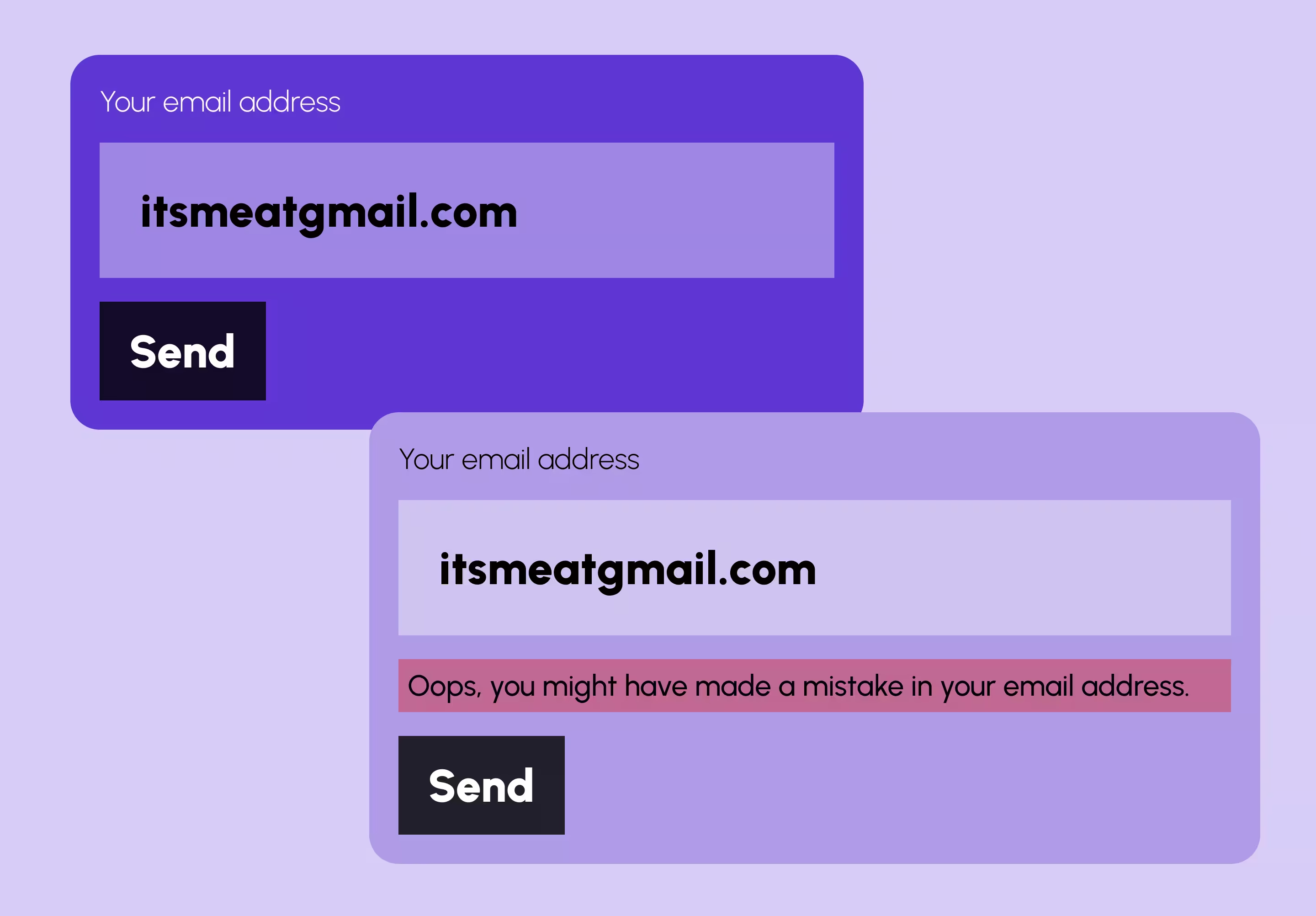
Poor error handling often goes unnoticed until you look at drop-off data. A user fills in the form, hits submit, and gets a vague red "Something went wrong" with no indication of which field or why. That wastes the effort they have already invested, and effort already spent makes the resulting abandonment more frustrating and more likely.
How to fix it: Use inline validation that flags errors in real time, at field level, as users type. Make messages specific: not "Invalid email" but "Please enter a valid email address, for example name@example.com." Avoid surfacing every error only after a full submission attempt.
6. Forms That Break or Feel Painful on Mobile
Mobile is a large share of traffic in Singapore and globally, so a form that works on desktop but is awkward on a phone is, functionally, a broken form for much of your audience. The usual culprits are tap targets too small to hit, no autocomplete, the wrong keyboard triggering, and zoom behaviour that disorients. And mobile visitors are often your highest-intent ones, searching on the go right when they have decided to act.
How to fix it: Test on at least two real devices, not just a browser simulator. Use correct input types (email, tel, text) so the right keyboard appears, keep tap targets at 44 pixels or more, and avoid hover-dependent validation. My responsive web design guide and mobile landing page optimisation for Singapore go further on mobile.
7. Weak or Generic Submit CTAs
The submit button is the final micro-moment of commitment, the last point at which a user decides to follow through or step back. A generic "Submit" or "Send" does none of the work a good CTA should at that moment, so momentum dies right at the final click with no reassurance and no value framing.
How to fix it: Replace generic labels with action-led, benefit-led copy: "Send My Enquiry", "Start the Conversation", or "Book My Free Consultation" all outperform "Submit". Pair the button with a single trust signal, such as a privacy note or a response-time expectation.
Contact Form UX for Singapore Businesses: What's Different
Most of the mistakes above are universal, but a few things carry extra weight locally. Singapore users are technology-literate with high expectations, so a poorly designed form reads as a sign of a low-quality operation rather than a simple oversight. Under the PDPA, collecting more personal data than necessary also creates compliance exposure, so limiting the form to essential fields is both good UX and good practice. And trust signals matter more here: a line like "Your information is kept private and never shared" reassures cautious users. If your form is not converting, our UX/UI design team runs contact-form audits as part of broader website work.
How to Identify Contact Form Friction on Your Website
You do not need a full audit to start diagnosing the problem. Watch for these signals:
- High traffic to the contact page but very few submissions
- Strong desktop conversion but noticeably weaker performance on mobile
- Repeat enquiries arriving through other channels from users who could not complete the form
- Unusually high spam leads, a sign the form has too little friction for bots and too much for real people
- No post-submission confirmation email, a sign the end-to-end flow was never fully tested
These consistently point to UX friction rather than a lack of genuine interest. A contact form is one piece of the wider work of improving your website's UX; for a structured look across the whole site, a common UX mistakes audit is the natural next step.
Quick Wins You Can Make Today
Not every improvement needs a development sprint. Most teams can do these quickly:
- Remove any field not genuinely needed to start the conversation
- Change "Submit" to a specific label such as "Send My Enquiry"
- Add one sentence above the button explaining your response time
- Make the phone number optional with a short reassurance note
- Confirm the success message displays correctly after submission
- Test on a real iPhone and Android, not just a browser simulator
- Add a privacy line below the form ("We respect your privacy. No spam, ever.")
On Webflow, most of these can be done in the Designer without custom code. If you are weighing a bigger structural change, single-step vs multi-step form design and form accessibility best practices are worth a read.
Frequently Asked Questions
Why is my contact form getting traffic but no submissions?
The likeliest cause is UX friction, not a lack of interest. Common culprits are too many required fields, missing trust signals, unclear next steps, or a mobile experience that is hard to complete. Auditing the form against the seven mistakes above is a good starting point.
How many fields should a contact form have?
As few as it takes to start a meaningful conversation, usually name, email and a short message, so three to four fields. Every field beyond that reduces completion, and anything else can be gathered during the follow-up.
How do I improve contact form conversions on mobile?
Use correct HTML input types so the right keyboard appears, keep tap targets at 44 pixels or more, test on real devices rather than simulators, avoid hover-dependent validation, and make sure the form does not trigger unexpected zoom on small screens.
What trust signals should I add near my contact form?
A short privacy reassurance, a stated response time, a no-obligation note, and where relevant a recognisable client logo or one-line testimonial. The goal is to answer the unspoken question: is it safe to reach out to this company?
Conclusion
Contact forms fail quietly, and the cost is real: every visitor who reaches the page and leaves without submitting is a lead that could have become a client.
If you are generating traffic but struggling to convert it into enquiries, start by assuming it is a UX problem, because it almost always is. Pick two or three of the seven fixes above, beginning with cutting fields and rewriting the submit button, since those move the most for the least effort. Change one thing at a time and watch your submission rate so you know what actually worked.
And if you would rather have someone find the friction and fix it with you, get in touch.
{{build-better-experience="/directory"}}
Categories
Written By

Resources
Related Articles
Deep dive into our latest news and insights.


.webp)
